For help signing in to the Ancestry app, see Ancestry App Installation & Sign in Guide.
Signing in
-
In the top-right corner of any page on Ancestry, choose
Sign in.
If you don’t see Sign in, an account may already be signed in. To switch accounts, sign out first.
Sign in to Ancestry
-
Choose how your account was created:
-
Email and password (Most accounts): Enter your Ancestry username or email and password, then select Sign in.
-
Google: Select Sign in with Google only if your Ancestry account is already linked to your Google account. Follow the prompts to authenticate.
-
Apple: Select Sign in with Apple only if your Ancestry account is already linked to your Apple ID. Follow the prompts to authenticate.
-
-
You're signed in. Enjoy using Ancestry!
If you’ve signed in on a public computer or mobile device, remember to sign out of Ancestry when you’re done.
Signing out
- In the top-right corner of any page on Ancestry, select your name, username, or profile picture and choose Sign Out.
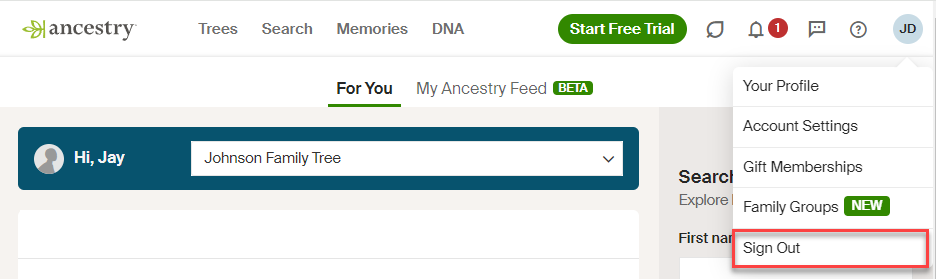
Troubleshooting
If you forgot your password
If you don’t know your password, see Resetting a Forgotten Password.
If your password isn't working
If you've reset your password and your new password isn't working, clear your cache and cookies and try again.
If you're having trouble with verification codes
For help with verification codes, select the company whose code you’re having trouble with:
If you don't have an Ancestry account
To sign in to Ancestry, you must first create a free account.
If a page, button, or link isn’t working
If a page, button, or link isn't working, see Fixing Page or Button Problems on Ancestry.
Why am I being asked for a verification code when signing in?
If you're being asked for a verification code, it means Two-step verification is currently enabled on your account. This feature adds an extra layer of security and is required to access specific tools, such as DNA matches and ThruLines. If your Ancestry account is already linked to Apple or Google, you can bypass entering a code by using Sign in with Apple or Sign in with Google instead. (Note: Only use these buttons if your accounts are already linked; otherwise, you may accidentally create a new, empty Ancestry account).
For questions about not receiving your two-step verification code or sharing an account that has two-step verification please refer to Two-step Verification.